
Why Do Most Bank Mobile Apps Not Offer Voice Access to Their Virtual Assistants?
By Steve Cocheo, Senior Executive Editor at The Financial Brand
Simple Subscribe
Subscribe Now!
Americans have been shouting “Hey Siri” or “Alexa” or “OK Google,” and giving attached devices orders, for more than a decade. Smart TVs and smart remotes have been accepting voice commands for years. More recently, conversational interfaces have been coming along for cars, such as “Hey Mercedes” and other forms of what the industry calls automotive voice recognition.
And then there’s Meta’s Muse, which the company brags “you can talk to in real time and reach in more places throughout your day.”
Yet among 17 major financial institutions studied, only two of those providing virtual assistants — Bank of America’s Erica and U.S. Bank’s Smart Assistant — offer voice navigation and interactions for common information requests and banking needs, according to the latest edition of Keynova Group’s Mobile Banker Scorecard.
Why this matters: “How many times do you pick up your phone and ask either for a Google search or an AI chat with voice commands or voice inquiries?” says Susan Foulds, managing director. “Voice interaction is becoming more of a common practice for consumers and it’s a feature that banks need to keep up with.”
Foulds says that while she doesn’t think bank apps need to keep up with every digital trend — the financial services industry faces risk and compliance issues that other businesses don’t — more institutions need to catch up to keep their virtual assistants relevant.
“Today, there are certain things that consumers just expect in an experience,” says Foulds.
Need to Know:
- Most large banks studied by Keynova that offer virtual assistants through their apps don’t provide a way to use them via voice.
- Meanwhile, banks are upping their game in mobile app security, but somewhat slowly, the company’s latest study found.
- And accessibility on bank mobile app is improving, though policies on accessibility and other matters can be hard to find on the apps.
Why Voice Control Is Now Essential for Bank Virtual Assistants
Half a decade ago, when mobile devices had really established traction, for a brief period some degree of voice interaction with banking apps had come to be regarded as a must. Then, as people began to think about talking about their banking while commuting, in stores and other public places, the industry’s interest in voice interaction cooled. Some experts scoffed at the idea.
But a good deal has changed, and, with the advent of GenAI and other common tools, people’s habits and preferences are shifting.
Key insight: “Navigation and requests using voice-interactive virtual assistants offer a highly convenient, hands-free experience for mobile users, especially for those with sight challenges,” Keynova argues in a report on the mobile scorecard.
Keynova suggests that the following common queries and chores would go better with a virtual assistant equipped for voice interaction:
- Scheduling bill payments.
- Displaying Zelle transactions.
- Initiating person-to-person payments.
- Scheduling transfers.
- Assisting with debit card controls.
- Displaying deposits.
- Moving a user to a relevant screen based on a voice query.
- Displaying the consumer’s credit score on demand.
Keynova found that BofA’s Erica can handle everything on that list, and that U.S. Bank’s Smart Assistant can perform more than half.
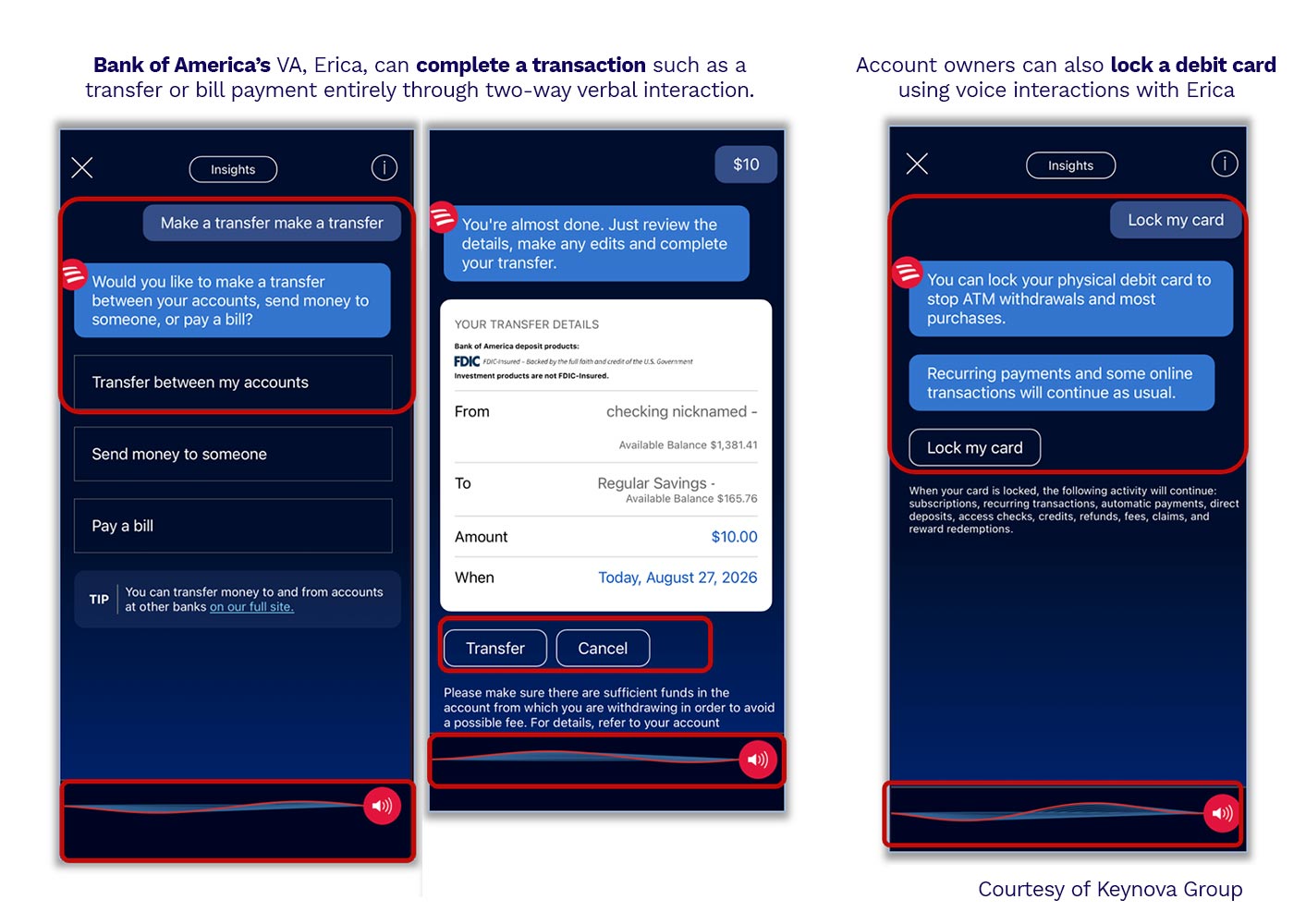
“Now, if you’re out in public, you may not be using voice and you may need to use your fingers, but in your office or in your home you can just pick up your device and speak,” says Foulds.
Foulds believes that voice interactive virtual assistants could help many people with physical disabilities or other issues. “It can be more expedient for navigation and accessing information like credit scores quickly,” she says.
Read more: Resistance Is Futile: Don’t Let Apple’s Siri AI Push Your Bank Behind The Glass
Banks Continue to Move Slowly Beyond Mobile Security Basics
Keynova’s study also found that banks have begun to move beyond elementary, longtime safeguards such as login security questions and one-time passcodes. Overall, progress has been slow, but it is coming along, according to Foulds.
Passkey authentication: Passkeys rely on the user’s device itself, including facial or other biometric identification, as well as a unique connection to one particular website or app. The report found that 18% of the banks have adopted passkeys as an option for their apps, and 29% have adopted them for their mobile web services.
Keynova found that Wells Fargo, Capital One and Chase are the only banks in the study that offer passkey authentication for logging into their mobile apps.
Use of multi-factor authentication or an additional layer of authentication is required to reset a PIN for nearly half of the bank apps (47%) and 41% of the banks’ mobile websites.
Nearly a quarter of the banks use their mobile apps as authenticators for receiving push notifications containing permission links, enabling logins on different devices and different browsers.
Read more: How Many of These Mobile App Best Practices Is Your Bank Following?
What is the Right App Security Strategy?
Much depends on what the institution involved is trying to protect, with banks tending to apply differing approaches depending on the product or service being accessed, according to Foulds.
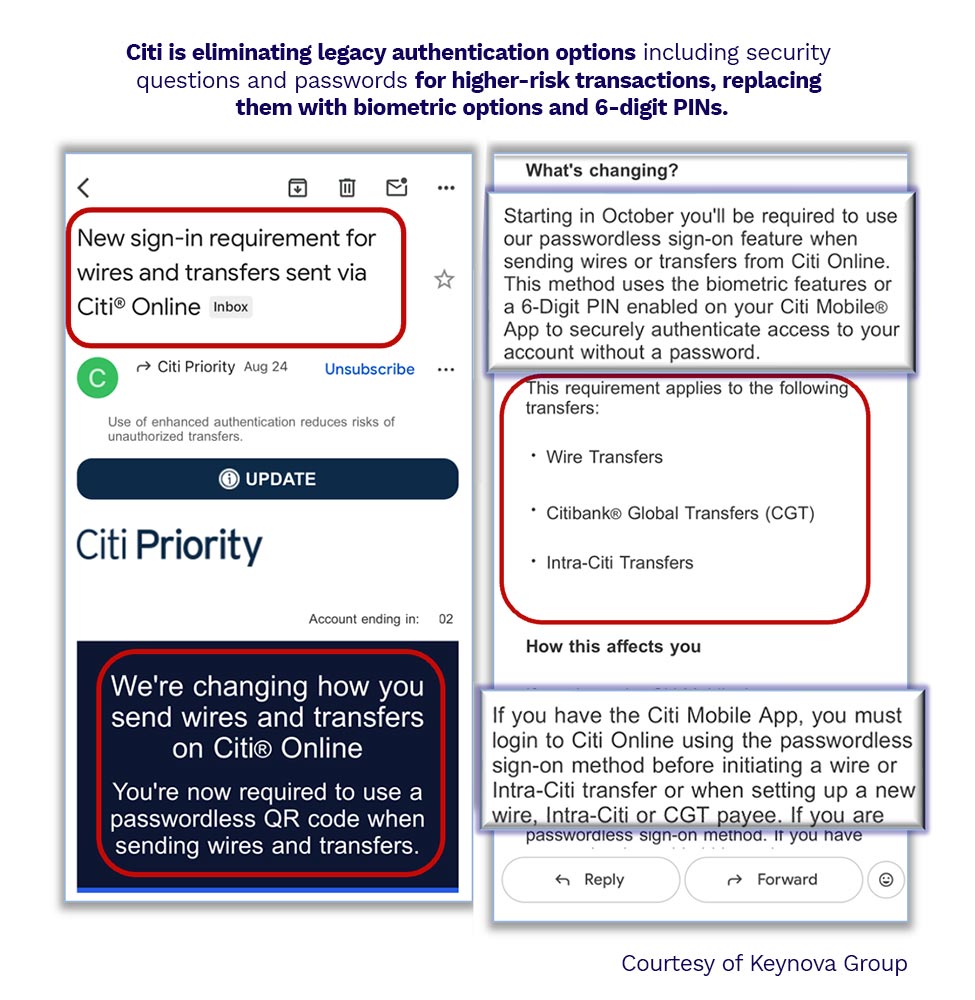
Case example: The Keynova report highlights Citibank as one of the leaders in security. For example, in the graphic below, Citi requires additional sign-in for wires and ACH transfers. The bank demands biometric identification and six-digit PINs for certain higher-risk transactions.
Another practice Foulds has seen are banks that permit customers to turn on optional one-time passcodes that must be used for every log-in. She said this can be helpful when multiple people in a family have access to device, or for customers who are especially security conscious.
“We guard our phones so closely, but how often, particularly in a busy family’s life, are phones left around the kitchen?” says Foulds.
Read more: Why Mobile Apps (and Their Users) Are Your New Front Line in Banking Security
Accessibility Improves, But Key Elements Are Missing
Mobile devices’ display of banking apps can be harder for users to read, versus a desktop or laptop display. The study found that to compensate for this, about half of the banks evaluated offer viewing adjustments to improve legibility. Users can adjust text size, and toggle between light and dark mode, and can choose landscape display, giving them a widescreen view on their phone.
Accessibility to key policies through the app can be dicey, however. The study found, for instance, that less than half of the banks provide links to accessibility policies via the app and mobile web log-in screens.
“Closing these mobile digital policy gaps will become increasingly important with demographic shifts and as customers expect the same transparency, control and accessibility elements across every digital banking channel,” according to Keynova’s analysis.
Read next: Why Bank App Virtual Assistants Still Need Assistance Themselves


